
API
The Restaurant API
A REST API and an MCP server for managing your restaurants and menus with one organization wide key. Both are the same service, forwarding to Honeycomb's core platform on your behalf.
Getting an API key
Self-serve key generation is available to organizations already on the platform. If you are a new organization looking for API access, email ashaya@honeycomb.ai to get started.
- Log into your dashboard at console.honeycomb.ai as an admin or owner of your organization.
- Open the Developer tab in the left sidebar.
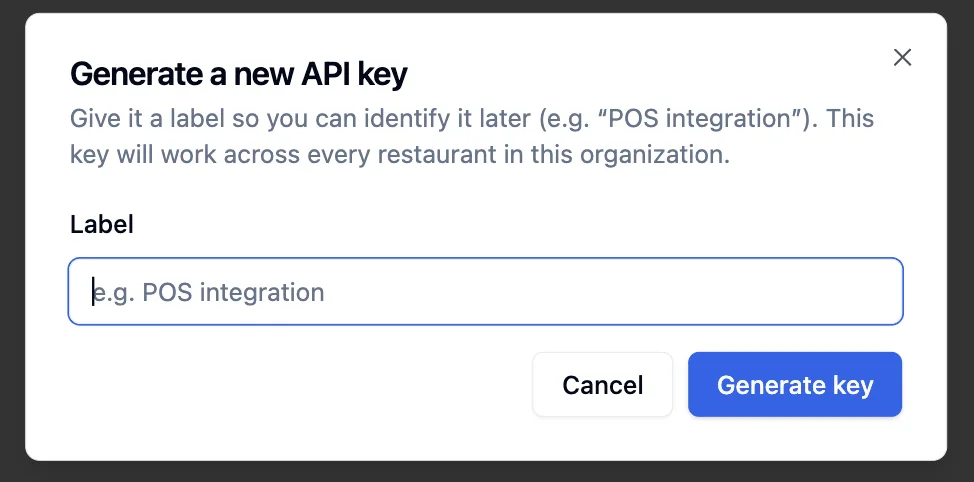
- Click Generate new key and give it a label.
- Copy the key immediately. It is shown in full only once.
Base URLs
| Surface | URL | Notes |
|---|---|---|
| REST API | https://api.honeycomb.ai/v3 | Every route below is under this prefix |
| MCP server | https://mcp.honeycomb.ai/mcp | Streamable HTTP transport |
Both URLs point at the same underlying service. A request on one cannot reach the routes that belong to the other.
Authentication
Send your key on every request as the X-Api-Key header. There is
no separate login step.
curl https://api.honeycomb.ai/v3/restaurants \
  -H "X-Api-Key: hc_your_key_here"
The API does not reinterpret errors. If your key is missing, wrong, or scoped to a different organization than the restaurant you asked about, you get the underlying platform's own error back unchanged.
| Status | Body | Cause |
|---|---|---|
| 401 | {"detail": "Missing credentials"} | No X-Api-Key header sent |
| 401 | {"detail": "Invalid or revoked API key"} | Key does not exist or was revoked |
| 403 | {"detail": "Not authorized for this restaurant"} | Key is valid but for a different organization |
Rate limits
Requests are limited to 1 per second, evaluated over a rolling hour. Going
over the limit returns a 429 with a Retry-After header.
OpenAPI spec
The full request/response schema for every endpoint below, generated directly from the live service, in standard OpenAPI 3.1 JSON. Import it into Postman, Insomnia, an SDK generator, or anything else that reads OpenAPI.
Both links hit the live deployment directly, so they always match the version of the API currently running, not a copy that can drift out of date.
Endpoints
Each REST route below has a matching MCP tool with the same name and behavior. Full field-by-field types are in the schema below and in the OpenAPI spec.
GET /restaurants
List every restaurant in your organization. Your key already identifies your organization, so there is no id to pass. MCP tool: list_restaurants.
No path params, no request body.
// 200 response, RestaurantListResponse
{
  "organization_id": "org_2ab91f",
  "restaurants": [
    {
      "id": "92",
      "name": "Body Energy Club",
      "slug": "body-energy-club",
      "is_active": true,
      "address": "",
      "phone_number": "",
      "image": "https://.../restaurant_images/92.png"
    }
  ]
}
GET /restaurants/{restaurant_id}/menu
The full menu for one restaurant: every section, item, allergen, nutrition value, image, and verification status. MCP tool: get_menu.
Path param: restaurant_id (integer). No request body. Response is MenuResponse, see the full schema below.
PUT /items/{item_id}
Update an item. Set apply_to_linked_items: true to also push the edit to every item this one is linked to, across restaurants. MCP tool: update_item.
Path param: item_id (integer).
// request body, UpdateItemRequest
{
  "restaurant_id": "92",
  "item": {
    "name": "Berry Glow-Up",
    "description": "Berries, banana, avocado, and coconut.",
    "section": "Featured Smoothies",
    "price": "$12.99",
    "isActive": true,
    "verified": true,
    "allergens": [],
    "traceAllergens": [],
    "modifiable": [],
    "nutritional_info": { "calories": 310, "protein": 8, "carbs": 42, "fat": 11 }
  },
  "apply_to_linked_items": false
}allergens, modifiable, nutritional_info, and
verified are read as a complete set on every update. Fetch the item
from get_menu first and send its current values back for any field
you are not intentionally changing, or that field gets cleared.
Response (200) is a MenuItem, the same shape returned inside get_menu; see the schema below.
POST /restaurants/{restaurant_id}/items
Add a new item to a restaurant's menu. MCP tool: create_item.
Path param: restaurant_id. Request body is the same shape as PUT /items/{item_id}'s item object, wrapped the same way (a restaurant_id field is required by the schema but the path value always wins). Response (201) is the created MenuItem, with its new id.
DELETE /items/{item_id}
Remove an item. This is a soft delete, safe to call without a separate confirmation step. There is no endpoint to delete a restaurant.
Path param: item_id. No request body.
// 200 response, GenericStatusResponse
{ "status": "success", "id": 18317 }
POST /items/{item_id}/modifiers
Add a modifier to an item. Set apply_to_linked_items: true to also push it, and the item's other default fields, to every linked item. MCP tool: add_modifier_to_linked_items.
Path param: item_id.
// request body, AddModifierRequest
{
  "restaurant_id": "92",
  "modifier": {
    "name": "Extra protein scoop",
    "description": "",
    "price_delta_cents": 150,
    "added_allergens": ["dairy"],
    "removed_allergens": [],
    "nutritional_delta": { "calories": 90, "protein": 20 }
  },
  "apply_to_linked_items": false
}

// 201 response, AddModifierResponse
{
  "modifier": { "id": 81402, "status": "success" },
  "synced_item_ids": []   // item ids the modifier was also pushed to
}
GET /items/{item_id}/links
List the restaurants and items a given item is linked to, and each link's sync status. MCP tool: list_item_links.
Path param: item_id. No request body.
// 200 response, ItemLinksResponse
{
  "item_id": 5762,
  "role": "standalone",           // "standalone", "linked", or "source"
  "sharing_enabled": false,
  "outgoing_links": [
    {
      "link_id": 1,
      "target_item_id": 502,
      "target_item_name": "Berry Glow-Up",
      "target_restaurant_id": 8,
      "target_restaurant_name": "Earls Waikiki - Demo",
      "sync_status": "synced"   // "synced" or "pending_sync"
    }
  ]
}
Schema
The response shape for get_menu, the richest object in the API.
is_active, trace_allergens,
additional_info). The item object you send to
update_item / create_item uses the underlying
platform's own casing (isActive, traceAllergens,
additionalInfo). Copying a response straight back into a request
body will silently drop those three fields rather than error, since extra
fields are ignored; see the request examples above for the exact keys to use.
MenuResponse
  restaurant_id: int
  sections: MenuSection[]

MenuSection
  name: string
  info: string
  items: MenuItem[]

MenuItem
  id: int
  name: string
  description: string
  section: string
  price: string           // formatted, for example "$12.00"
  is_active: bool
  verified: bool           // human checked, not only estimated
  allergens: string[]
  trace_allergens: string[]
  nutrition: NutritionInfo
  modifiable: string[]     // modifier group names available on this item
  image_url: string | null
  family_id: int | null
  linked_item_count: int
  link_role: string        // "standalone", "linked", or "source"
  has_divergent_siblings: bool

NutritionInfo
  calories: number
  protein: number
  carbs: number
  fat: number
micro_nutrients: object | nullThe item you send to update_item / create_item
Same information as MenuItem above, but with the platform's own field casing, and everything optional except the four fields called out below.
ItemFields
  id: int | null            // omit to create, include to edit
  name: string | null
  description: string | null
  section: string | null
  price: string | null       // e.g. "$12.00"
  additionalInfo: string | null
  isActive: bool | null
  image: string | null

  // required, read as a complete set on every write; see the callout above
  allergens: string[]         // default []
  verified: bool               // default false
  modifiable: string[]         // default []
  nutritional_info: { calories, protein, carbs, fat }   // default all 0

  traceAllergens: string[] | null

ModifierInput
  name: string                          // default ""
  description: string                   // default ""
  price_delta_cents: int | null
  added_allergens: string[]             // default []
  removed_allergens: string[]           // default []
  nutritional_delta: object | null      // e.g. { "calories": 90 }